Introduction: Why Loops Matter in JavaScript
As professional web developers, we deal with repetition every single day. Whether you need to process thousands of records or print a simple sequence, doing repetitive tasks manually is inefficient and impossible for large datasets.
This is where JavaScript loops become the backbone of efficient code. Loops help you automate repetitive logic, keeping your programs clean, concise, and performant.
What Are Loops in JavaScript?
A loop is a programming tool used to reduce repetitive tasks by executing a block of code again and again, as long as a specified condition remains true. Using loops makes your code more concise and efficient.
By using loops, you can automate repetitive operations like iterating over arrays, generating dynamic content, or processing API data.
Types of Loops in JavaScript
for loop
while loop
do-while loop
for…in loop
for…of loop
forEach loop
Let’s explore each one with practical examples.
1. The for Loop
The for loop is the most common and structured loop in JavaScript. It executes a block of code a specific number of times. Its control logic is neatly packaged into three key statements, separated by semicolons, within the parentheses:
(Initial Expression; Condition; Update Expression)
Syntax Structure
for (initialization; condition; update) {
  // Code block
}
Example
To repeat a task 5 times, you can start i at 0 and check if i < 5, or start i at 1 and check if i <= 5.
for (let i = 1; i <= 5; i++) {    // Initialization; Condition; Update
  console.log("Count:", i);       // Code block executes here
}
Output:
Count: 1
Count: 2
Count: 3
Count: 4
Count: 5
Note : Variables declared with let inside a for loop are block-scoped and can’t be accessed outside it.
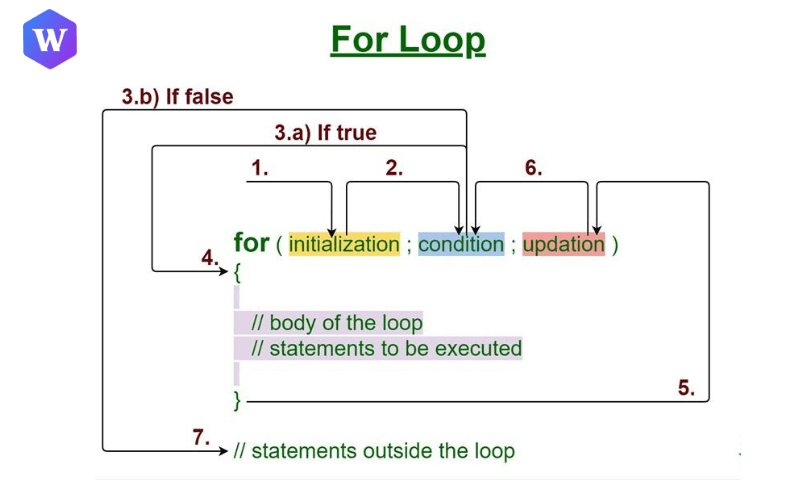
Understanding the Flow of a for Loop
1. Initialization
The loop begins. We create or set a starting value for our variable (like let i=0;).
You can use an already declared variable or one that’s local to the loop.Condition Checking
2. Condition Checking
Before every iteration, JavaScript checks whether the condition is true (for example, i < 5).
If it’s true, the loop continues; if not, the loop stops.
Since the condition is checked before running the code, it’s called an entry-controlled loop..
3. Code Execution
When the condition is true, the code block inside the loop runs.
This is where your main task (like printing a value or updating data) happens.
4. Update (Increment/Decrement)
After the code executes, the loop variable is updated, usually increased (i++) or decreased (i--), to prepare for the next iteration.
5. Loop Termination
Once the condition becomes false, the loop stops running.
This marks the end of the loop’s life cycle, and the program continues with the next statement after the loop.
2. The while Loop
The while loop executes as long as its condition is true. It’s ideal when you don’t know the number of iterations in advance.
Example
let i = 0;    // Initialization happens before

while (i < 3) {   // Condition is checked first
  console.log("Number:", i);
  i++;   // Update is inside the body
}
Output:
Number: 0
Number: 1
Number: 2
Note: A major difference from the for loop is that initialization of the loop variable happens before the loop, and the increment/update must be placed inside the loop body. Because the condition is checked first, it is an Entry Control Loop.
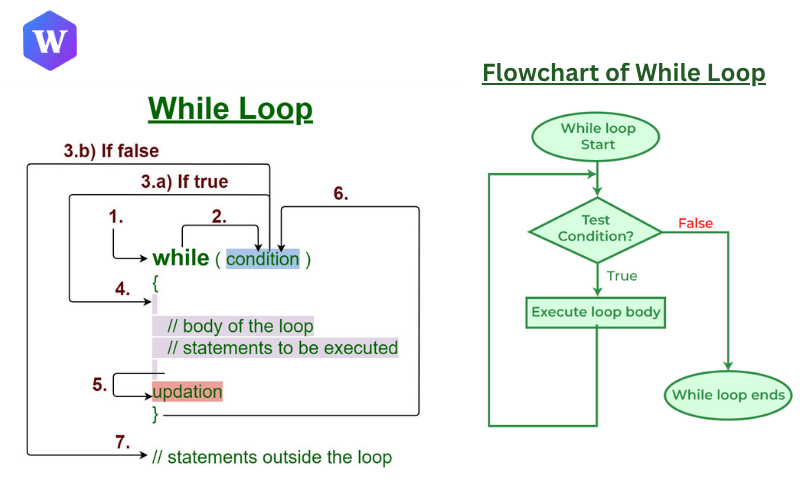
Understanding the Flow of a While Loop
1. Condition Checking
The while loop begins by checking a Boolean condition.
If the condition evaluates to true, the loop body executes.
If it evaluates to false, the program skips the loop and moves directly to the next statement after it.
2. Code Execution
When the condition is true, the statements inside the loop body are executed.
These statements often include an update expression, which changes the value of the variable being tested.
3. Loop Termination
Once the condition evaluates to false, the loop stops executing.
3. The do-while Loop
The do-while loop ensures that the block runs at least once, even if the condition is false, making it an exit control loop. While it’s used less frequently, it fits specific use cases where a task must run initially, regardless of the starting conditions.
Example
let i = 0;
do {
  console.log("Executed at least once:", i);
  i++;
} while (i < 3);
Output:
Executed at least once: 0
Executed at least once: 1
Executed at least once: 2
Syntax Alert: The do-while loop ends with a semicolon after the condition:
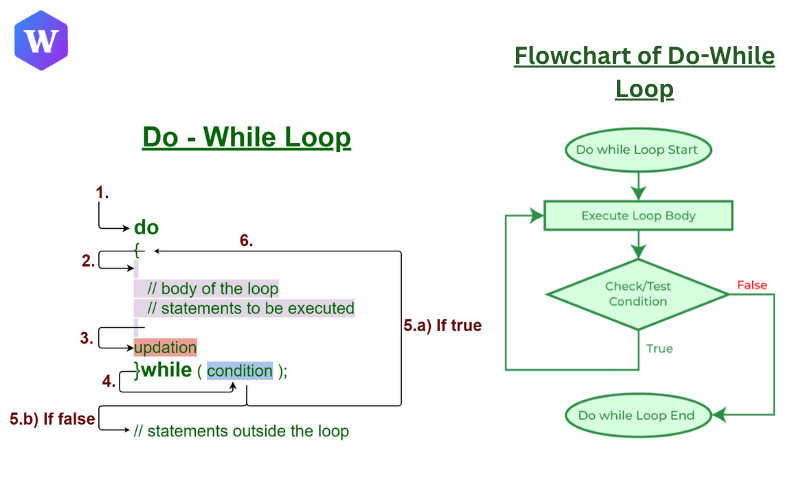
Understanding the Flow of a Do-While Loop
1. Code Execution (First Run)
The loop starts by executing the statements inside the do block, without checking any condition initially.
This is what makes the do...while loop unique compared to the while loop.
2. Condition Checking
After the code block runs and the loop variable is updated, the condition is evaluated.
If the condition is true, the next iteration of the loop begins.
If it’s false, the loop stops running.
3. Loop Termination
When the condition becomes false, the loop terminates, marking the end of its life cycle.
Iterating Over Data Structures
As a developer, you don't always want to manage index counters; sometimes you just want to iterate over the contents of a structure like an array or object.
4. for...in Loop (Object Keys)
The for...in loop iterates over the keys (property names) of an object.
const person = { name: "Alice", age: 22, city: "Delhi" };

for (let key in person) {
// 'key' holds the property name (e.g., "name")
  console.log(key, ":", person[key]);  // Here, key represents property names, and person[key] gives their values
}
Output:
name : Alice
age : 22
city : Delhi
Avoid using for...in with arrays, as it loops over all enumerable properties, not just numeric indexes.
5. for...of Loop (Iterable Values)
The for...of loop iterates directly over values of iterable data (like arrays or strings). Crucially, the iterator variable holds the value of the element in each cycle, not the index or key.
const fruits = ["Apple", "Banana", "Cherry"];

for (let fruit of fruits) {
  console.log(fruit);
}
Output:
Apple
Banana
Cherry
6. forEach Method (Functional Looping)
The forEach method executes a provided function once for each element in an array. It’s a common and clean way to iterate over arrays.
const colors = ["Red", "Green", "Blue"];

colors.forEach((color) => console.log(color));
Output:
Red
Green
Blue
Use it for readability when you don’t need flow control.
Avoiding Infinite Loops
An infinite loop occurs when the condition never becomes false, or when you forget to update the loop variable.
Example of a Bad Loop
let i = 0;
while (i < 5) {
  console.log(i);
  // Missing i++ causes infinite loop
}
Warning: Infinite loops can crash your browser or freeze scripts. Always double-check your stopping conditions and updates.
Real-World Examples
1. Iterating API Data
for (const user of usersData) {
  console.log(`User: ${user.name}`);
}
2. Generating Dynamic HTML
for (let i = 1; i <= 3; i++) {
  document.body.innerHTML += `<p>Item ${i}</p>`;
}
3. Calculating a Sum
let sum = 0;
for (let i = 1; i <= 100; i++) {
  sum += i;
}
console.log("Sum:", sum);
The Professional Developer Mindset
Becoming a great developer isn’t about memorizing syntax, it’s about understanding logic and flow.
When to use each loop:
Use do-while if you need guaranteed execution.
Use for when you know iteration limits.
Use for…of or forEach for arrays.
Use for…in for objects.
Understand control flow:
In a for loop, initialization runs once, and the update happens after each iteration.
Embrace learning through practice:
Search, read, understand, and code, don’t just copy.
Build small projects as you master fundamentals.
Gradually move from easy to medium, then to advanced topics.
Remember: even expert developers Google things, it’s not about memory, it’s about mastery.
FAQs About JavaScript Loops
Q1. What’s the difference between for...in and for...of?
Ans: for…in iterates over object keys, while for…of iterates over iterable values.
Q2. Can I use break or continue inside forEach?
Ans: No, forEach doesn’t support flow control. Use for or for…of instead.
Q3. What causes infinite loops?
Ans: A condition that never becomes false or a missing update statement.
Q4. Which loop is best for arrays?
Ans: for…of or forEach loops are the most readable and practical for array iterations.
Next article: JavaScript conditional statements
Join the conversation
Sign in to share your thoughts and engage with other readers.
No comments yet
Be the first to share your thoughts!