JavaScript Objects for Beginners: Easy Guide to Properties, Methods & Destructuring

What Are JavaScript Objects?
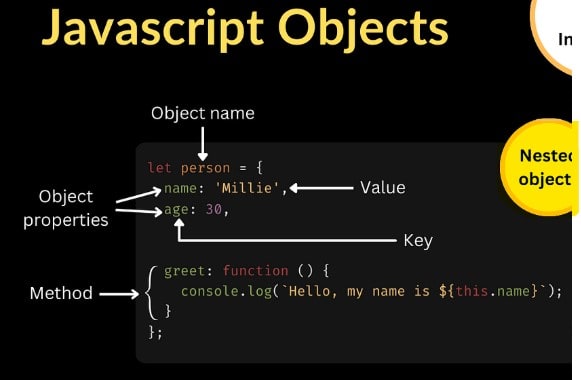
A JavaScript object is a collection of key-value pairs. The keys are called properties, and the values can be anything, numbers, strings, functions, arrays, or even other objects. A property's value can be a function, in which case the property is known as a method.
Objects in JavaScript can be compared to objects in real life. In JavaScript, an object is a standalone entity, with properties and type.
Think of a book in real life. A book is an object that has multiple properties describing it:
title : The name of the book
author : Who wrote it
pages : Number of pages
In JavaScript, we can represent this book as an object:
const book = {
  title: "The Alchemist",
  author: "Paulo Coelho",
  pages: 208,
};
Here’s what’s happening:
book is the object.
title, author, pages are properties of the object.
Each property has a value (like "The Alchemist" for title).
Introduction: Why Objects Matter in JavaScript
If you are learning JavaScript, one of the most important concepts you will encounter is objects. Objects are the backbone of most JavaScript programs, they allow you to store, organize, and manipulate data in a structured way.
In reality, almost everything in JavaScript is an object, from arrays and functions to custom data structures you create. Understanding objects will make you more confident in building real-world projects.
Objects are essential for several reasons:
Organization: They keep related data together, making your code easier to understand and maintain
Modeling Real-World Entities: Objects naturally represent things like users, products, or configurations
Code Reusability: Objects can be passed around your application, reducing code duplication
Flexibility: You can add, modify, or remove properties dynamically as your needs change
Here's a simple example that shows the power of objects:
// Without objects: scattered variables
const userName = "Sarah Chen";
const userAge = 28;
const userEmail = "sarah@example.com";

// With objects: organized data
const user = {
  name: "Sarah Chen",
  age: 28,
  email: "sarah@example.com"
};
The object version is cleaner, easier to pass to functions, and scales better as you add more user properties.
as you add more user properties.
Creating Objects in JavaScript
JavaScript offers three main approaches for creating objects, each suited to different scenarios.
Method 1: Object Literals (Most Common)
Object literals use curly braces { } to define an object in a single, readable expression. This is the go-to method for creating standalone objects.
const laptop = {
  brand: "Apple",
  model: "MacBook Pro",
  year: 2023,
  specs: {
    ram: "16GB",
    storage: "512GB SSD"
  }
};

console.log(laptop.brand); // "Apple"
console.log(laptop.specs.ram); // "16GB"
When to use: Creating single objects, configuration objects, or when you need something quick and readable.
Multi-Word Property Names
If your property name contains spaces or special characters, wrap it in quotes and use bracket notation to access it:
const restaurant = {
  name: "The Garden Café",
  "opening hours": "9:00 AM - 10:00 PM",
  "customer rating": 4.5
};

// Access with bracket notation
console.log(restaurant["opening hours"]); // "9:00 AM - 10:00 PM"
Method 2: Constructor Functions and Classes
When you need to create multiple objects with the same structure, like multiple user profiles or product listings, use constructor functions or the modern ES6 class syntax.
// Modern ES6 Class Syntax (Recommended)
class User {
  constructor(name, email, role) {
    this.name = name;
    this.email = email;
    this.role = role;
    this.isActive = true; // Default value
  }

  // Method inside the class
  displayInfo() {
    return `${this.name} (${this.role})`;
  }
}

// Create multiple users from the same blueprint
const admin = new User("Alice Johnson", "alice@company.com", "Admin");
const editor = new User("Bob Smith", "bob@company.com", "Editor");

console.log(admin.displayInfo()); // "Alice Johnson (Admin)"
console.log(editor.role); // "Editor"
When to use: When creating multiple instances of the same object type, or when you need to encapsulate functionality with data.
Method 3: Object.create()
Object.create() creates a new object with a specified prototype, giving you precise control over inheritance without needing a full constructor.
const vehiclePrototype = {
  start: function() {
    console.log(`${this.type} is starting`);
  }
};

const bike = Object.create(vehiclePrototype);
bike.type = "Motorbike";
bike.start(); // Motorbike is starting
When to use: Advanced inheritance patterns, factory functions, or when you need fine-grained control over the prototype chain.
Accessing and Modifying Properties
Properties are the data containers within an object, each one has a key (the name) and a value (the data).
JavaScript provides two ways to access object properties:
1. Dot Notation (Most Common)
Use dot notation when you know the property name in advance:
const book = {
  title: "The Midnight Library",
  author: "Matt Haig",
  pages: 288
};

console.log(book.title); // "The Midnight Library"
console.log(book.author); // "Matt Haig"
2. Bracket Notation (For Dynamic Access)
Use brackets when the property name is stored in a variable, contains special characters, or is determined at runtime:
const book = {
  title: "1984",
  author: "George Orwell",
  "publication year": 1949
};

// Dynamic property access
const propertyName = "author";
console.log(book[propertyName]); // "George Orwell"

// Multi-word properties
console.log(book["publication year"]); // 1949

// Computed properties
const userInput = "title";
console.log(book[userInput]); // "1984"
Adding and Updating Properties
Objects in JavaScript are mutable, meaning you can add or change properties after creation:
const car = {
  make: "Toyota",
  model: "Camry"
};

// Add a new property
car.year = 2022;
car.color = "Silver";

// Update existing property
car.model = "Camry Hybrid";

console.log(car);
// {
//   make: "Toyota",
//   model: "Camry Hybrid",
//   year: 2022,
//   color: "Silver"
// }
You can also use bracket notation for dynamic property assignment:
const settings = {};
const settingName = "darkMode";

settings[settingName] = true;
settings["fontSize"] = "16px";

console.log(settings); // { darkMode: true, fontSize: "16px" }
Deleting Properties
To completely remove a property from an object, use the delete operator:
const profile = {
  username: "johndoe",
  email: "john@example.com",
  temporaryToken: "abc123"
};

// Remove the temporary token
delete profile.temporaryToken;

console.log(profile);
// { username: "johndoe", email: "john@example.com" }
Important distinction: Setting a property to undefined or null does NOT remove it—the key still exists with an empty value:
const obj = { a: 1, b: 2 };

obj.b = undefined; // Property still exists
console.log('b' in obj); // true

delete obj.b; // Property completely removed
console.log('b' in obj); // false
Object Methods and the this Keyword
When a function is stored as a property of an object, it becomes a method, an action that the object can perform.
Creating Methods
You can define methods in several ways:
const calculator = {
  // Method using traditional function syntax
  add: function(a, b) {
    return a + b;
  },

  // ES6 shorthand syntax (preferred)
  subtract(a, b) {
    return a - b;
  },

  multiply(a, b) {
    return a * b;
  }
};

console.log(calculator.add(5, 3)); // 8
console.log(calculator.multiply(4, 7)); // 28
Understanding this
The this keyword is a special reference that lets a method access other properties within the same object. Think of this as meaning "this current object":
const employee = {
  firstName: "Emma",
  lastName: "Wilson",
  department: "Engineering",

  // Method using 'this' to access other properties
  getFullName() {
    return `${this.firstName} ${this.lastName}`;
  },

  introduce() {
    return `Hi, I'm ${this.getFullName()} from ${this.department}`;
  }
};

console.log(employee.getFullName()); // "Emma Wilson"
console.log(employee.introduce()); // "Hi, I'm Emma Wilson from Engineering"
Without this, you'd have to hardcode the object name, which breaks if you rename the object or reuse the method elsewhere.
The Arrow Function Pitfall (Critical!)
Arrow functions do NOT have their own this. They inherit this from the surrounding scope, which usually leads to errors when used as object methods:
const person = {
  name: "Alex",

  // Regular function: 'this' works correctly
  greetRegular() {
    console.log(`Hello, I'm ${this.name}`);
  },

  // Arrow function: 'this' is undefined or points to wrong object
  greetArrow: () => {
    console.log(`Hello, I'm ${this.name}`); // this.name is undefined!
  }
};

person.greetRegular(); // "Hello, I'm Alex" ✓
person.greetArrow(); // "Hello, I'm undefined" ✗
Rule of thumb: Always use regular function syntax for object methods. Save arrow functions for callbacks, array methods, and situations where you want to preserve the outer scope's this.
Practical Method Example
Here's a real-world example showing methods in action:
const bankAccount = {
  owner: "Maria Garcia",
  balance: 1000,
  transactions: [],

  deposit(amount) {
    this.balance += amount;
    this.transactions.push({ type: "deposit", amount, date: new Date() });
    return `Deposited $${amount}. New balance: $${this.balance}`;
  },

  withdraw(amount) {
    if (amount > this.balance) {
      return "Insufficient funds";
    }
    this.balance -= amount;
    this.transactions.push({ type: "withdrawal", amount, date: new Date() });
    return `Withdrew $${amount}. New balance: $${this.balance}`;
  },

  getStatement() {
    return {
      owner: this.owner,
      balance: this.balance,
      transactionCount: this.transactions.length
    };
  }
};

console.log(bankAccount.deposit(500)); // "Deposited $500. New balance: $1500"
console.log(bankAccount.withdraw(200)); // "Withdrew $200. New balance: $1300"
console.log(bankAccount.getStatement());
// { owner: "Maria Garcia", balance: 1300, transactionCount: 2 }
Object Destructuring: Extract Data Like a Pro
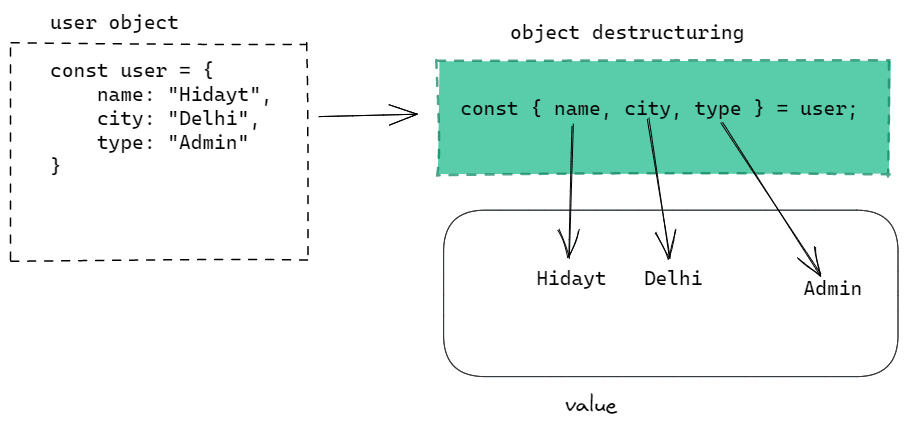
Destructuring is an ES6 feature that lets you extract multiple properties from an object into separate variables in one clean line of code.
Basic Destructuring
Instead of accessing properties one by one, destructuring extracts them all at once:
const user = {
  name: "Taylor Brooks",
  age: 32,
  email: "taylor@example.com",
  location: "San Francisco"
};

// Old way: one variable at a time
const name = user.name;
const age = user.age;
const email = user.email;

// New way: destructure multiple properties at once
const { name, age, email } = user;

console.log(name); // "Taylor Brooks"
console.log(age); // 32
console.log(email); // "taylor@example.com"
Default Values
Provide fallback values for properties that might not exist:
const settings = {
  theme: "dark",
  notifications: true
};

// 'language' doesn't exist, so it gets the default value
const { theme, notifications, language = "en" } = settings;

console.log(theme); // "dark"
console.log(language); // "en" (default)
This is incredibly useful when working with API responses or user input where some fields might be missing.
Renaming Variables (Aliases)
Sometimes you want to destructure a property but give it a different variable name:
const apiResponse = {
  data: { id: 101, value: "Success" },
  status: 200,
  message: "OK"
};

// Rename 'data' to 'responseData' and 'status' to 'httpStatus'
const {
  data: responseData,
  status: httpStatus,
  message
} = apiResponse;

console.log(responseData); // { id: 101, value: "Success" }
console.log(httpStatus); // 200
The syntax is { originalName: newName }.
Nested Destructuring
You can destructure nested objects in one statement:
const employee = {
  name: "Jordan Lee",
  position: "Senior Developer",
  contact: {
    email: "jordan@company.com",
    phone: "555-0123"
  },
  address: {
    city: "Austin",
    state: "TX"
  }
};

// Extract nested properties
const {
  name,
  contact: { email, phone },
  address: { city }
} = employee;

console.log(name); // "Jordan Lee"
console.log(email); // "jordan@company.com"
console.log(city); // "Austin"
The Rest Parameter (...)
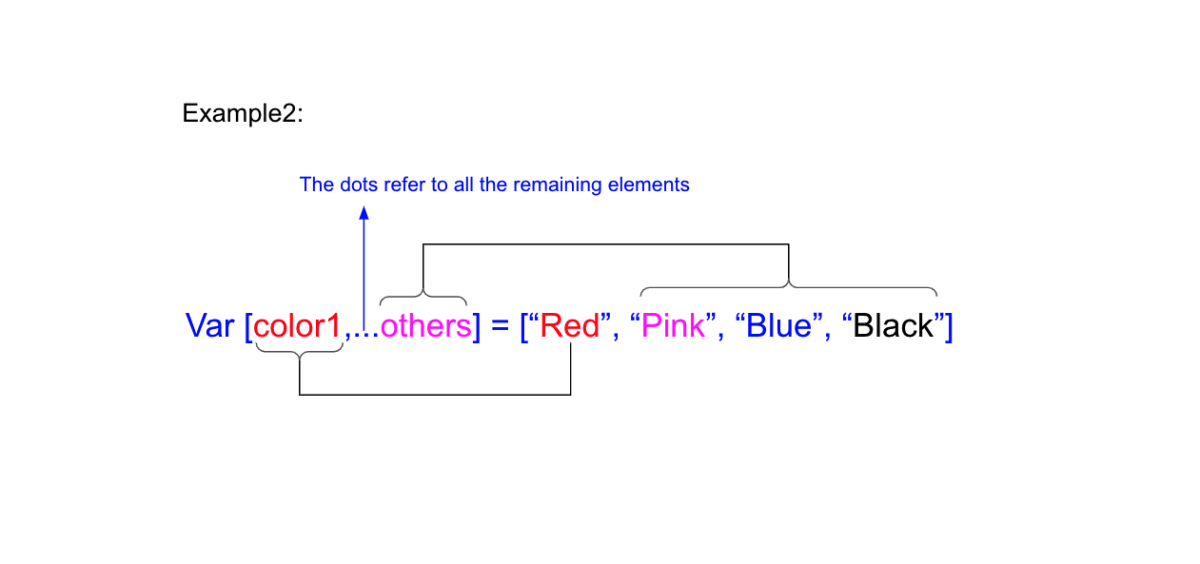
The rest parameter collects all remaining properties into a new object:
const product = {
  id: 501,
  name: "Wireless Headphones",
  price: 89.99,
  category: "Electronics",
  inStock: true,
  rating: 4.5
};

// Extract 'id' and 'name', collect everything else in 'details'
const { id, name, ...details } = product;

console.log(id); // 501
console.log(name); // "Wireless Headphones"
console.log(details);
// {
//   price: 89.99,
//   category: "Electronics",
//   inStock: true,
//   rating: 4.5
// }
This is perfect for splitting objects into "essential" and "optional" parts.
Destructuring in Function Parameters
One of the most powerful uses of destructuring is in function parameters, making your functions self-documenting:
// Without destructuring: unclear what properties are needed
function createUser(userObj) {
  return `User: ${userObj.name}, Email: ${userObj.email}`;
}

// With destructuring: immediately clear what data is required
function createUserBetter({ name, email, role = "user" }) {
  return `User: ${name}, Email: ${email}, Role: ${role}`;
}

// Call the function
const newUser = {
  name: "Chris Morgan",
  email: "chris@example.com"
};

console.log(createUserBetter(newUser));
// "User: Chris Morgan, Email: chris@example.com, Role: user"
This pattern is extremely common in React components and modern JavaScript libraries.
Common Pitfalls and Best Practices
Pitfall 1: Objects Are References, Not Copies
When you assign an object to a new variable, you're creating a reference to the same object in memory, not a separate copy:
const original = { count: 5 };
const reference = original; // NOT a copy!

reference.count = 10;

console.log(original.count); // 10 (changed!)
console.log(reference.count); // 10 (same object)
Both variables point to the same object, so changes through one variable affect the other.
Solution: Creating Copies
For a shallow copy (copies top-level properties only), use the spread operator:
const original = { count: 5, name: "Test" };
const copy = { ...original }; // Creates a new object

copy.count = 10;

console.log(original.count); // 5 (unchanged!)
console.log(copy.count); // 10 (independent)
For deep copies (including nested objects), you have several options:
// Option 1: JSON methods (simple but has limitations)
const deepCopy = JSON.parse(JSON.stringify(original));

// Option 2: Use a library like Lodash
// const deepCopy = _.cloneDeep(original);

// Option 3: Recursive function for complex objects
function deepClone(obj) {
  if (obj === null || typeof obj !== 'object') return obj;
  const clone = Array.isArray(obj) ? [] : {};
  for (let key in obj) {
    clone[key] = deepClone(obj[key]);
  }
  return clone;
}
Pitfall 2: Checking if Properties Exist
Accessing a non-existent property returns undefined, but so does a property explicitly set to undefined. Use the in operator or hasOwnProperty() to check if a property truly exists:
const obj = {
  name: "Test",
  value: undefined
};

// Checking with 'in' operator (checks own and inherited properties)
console.log('name' in obj); // true
console.log('value' in obj); // true (property exists, even though undefined)
console.log('missing' in obj); // false

// Checking with hasOwnProperty (only own properties)
console.log(obj.hasOwnProperty('name')); // true
console.log(obj.hasOwnProperty('toString')); // false (inherited from prototype)
Best Practice 1: Use Strict Mode
Always include 'use strict'; at the top of your JavaScript files or functions. It catches common errors like accidentally creating global variables:
'use strict';

const myObject = {
  name: "Test"
};

// Without strict mode, this typo creates a global variable
// With strict mode, this throws an error
myObject.nmae = "Typo"; // Error: Cannot create property 'nmae'
Best Practice 2: Use Meaningful Property Names
Choose descriptive property names that make your code self-documenting:
// Bad: unclear abbreviations
const u = {
  n: "John",
  a: 25,
  e: "john@example.com"
};

// Good: clear, descriptive names
const user = {
  name: "John",
  age: 25,
  email: "john@example.com"
};
Best Practice 3: Leverage Object Shorthand
When creating objects where property names match variable names, use ES6 shorthand:
const name = "Alice";
const age = 30;
const city = "Portland";

// Old way: repeat variable names
const person = {
  name: name,
  age: age,
  city: city
};

// New way: shorthand syntax
const personShort = { name, age, city };
Best Practice 4: Use Optional Chaining
When accessing deeply nested properties that might not exist, use optional chaining (?.) to avoid errors:
const user = {
  name: "Bob",
  address: {
    street: "123 Main St"
    // city is missing
  }
};

// Without optional chaining: might cause errors
// console.log(user.address.city.zipCode); // Error: Cannot read property 'zipCode' of undefined

// With optional chaining: safely returns undefined
console.log(user.address?.city?.zipCode); // undefined (no error)
console.log(user.contact?.phone); // undefined (contact doesn't exist)
Real-World Examples and Use Cases
Example 1: Configuration Objects
Objects are perfect for storing application settings:
const appConfig = {
  api: {
    baseURL: "https://api.example.com",
    timeout: 5000,
    retries: 3
  },
  features: {
    darkMode: true,
    notifications: true,
    analytics: false
  },
  user: {
    defaultLanguage: "en",
    timezone: "UTC"
  }
};

// Destructure config for use in your app
const { api: { baseURL, timeout }, features: { darkMode } } = appConfig;
Example 2: Form Data Handling
Objects naturally represent form data:
function handleFormSubmit(event) {
  event.preventDefault();

  const formData = {
    username: event.target.username.value,
    email: event.target.email.value,
    password: event.target.password.value,
    agreeToTerms: event.target.terms.checked
  };

  // Destructure and validate
  const { username, email, password } = formData;

  if (!username || !email || !password) {
    console.error("All fields are required");
    return;
  }

  // Send to API
  submitUser(formData);
}
Example 3: API Response Handling
Destructuring makes API responses cleaner to work with:
async function fetchUserData(userId) {
  const response = await fetch(`https://api.example.com/users/${userId}`);
  const data = await response.json();

  // Destructure the response with defaults
  const {
    name = "Unknown",
    email,
    profile: { bio = "No bio available", avatar } = {},
    settings: { theme = "light" } = {}
  } = data;

  return { name, email, bio, avatar, theme };
}
Example 4: Shopping Cart Management
A practical example combining methods, properties, and state management:
const shoppingCart = {
  items: [],

  addItem(product, quantity = 1) {
    const existingItem = this.items.find(item => item.id === product.id);

    if (existingItem) {
      existingItem.quantity += quantity;
    } else {
      this.items.push({ ...product, quantity });
    }

    return this.getTotal();
  },

  removeItem(productId) {
    this.items = this.items.filter(item => item.id !== productId);
  },

  updateQuantity(productId, newQuantity) {
    const item = this.items.find(item => item.id === productId);
    if (item) {
      item.quantity = newQuantity;
    }
  },

  getTotal() {
    return this.items.reduce((total, item) => {
      return total + (item.price * item.quantity);
    }, 0);
  },

  getItemCount() {
    return this.items.reduce((count, item) => count + item.quantity, 0);
  },

  clear() {
    this.items = [];
  }
};

// Usage
shoppingCart.addItem({ id: 1, name: "Laptop", price: 999 }, 1);
shoppingCart.addItem({ id: 2, name: "Mouse", price: 25 }, 2);
console.log(shoppingCart.getTotal()); // 1049
console.log(shoppingCart.getItemCount()); // 3
Summary
JavaScript objects are powerful tools for organizing and manipulating data. Key takeaways:
Objects store key-value pairs.
You can create objects via literals, constructors, or Object.create.
Properties can be added, updated, or deleted.
Methods let objects perform actions using
this.Destructuring makes extracting properties easier and cleaner.
With practice, you’ll find objects are everywhere in real projects, from handling API responses to building dynamic web apps. The more you experiment, the easier they become to work with.
Join the conversation
Sign in to share your thoughts and engage with other readers.
No comments yet
Be the first to share your thoughts!