What Are Variables in JavaScript? let, const, and var Explained Simply

Variables in JavaScript are named storage containers that hold data values in your program's memory.
JavaScript provides three keywords for declaring variables:
var (function-scoped, legacy)
let (block-scoped, reassignable)
const (block-scoped, constant reference).
The fundamental difference lies in their scope (where they're accessible) and mutability (whether they can be reassigned). Modern JavaScript best practice dictates using const by default for values that won't be reassigned, let for values that need reassignment, and avoiding var entirely due to its unpredictable function-scoping behavior and hoisting quirks.
Understanding these distinctions is critical because choosing the wrong declaration keyword can lead to scope leaks, memory issues, and difficult-to-debug runtime errors in production applications.
Introduction: Why Variable Declaration Matters More Than You Think
Every application you build, whether it's a real-time analytics dashboard, an e-commerce platform, or a mobile-first web application, depends entirely on how effectively you manage data in memory.
Here's the critical issue most developers overlook: The way you declare variables directly impacts code predictability, memory efficiency, and bug increases. Using var instead of let can create scope leaks that allow variables to persist beyond their intended lifetime. Choosing let when const would suffice signals to other developers (and your future self) that a value might change, creating unnecessary cognitive overhead when reading code.
The introduction of let and const in ECMAScript 2015 (ES6) wasn't merely syntactic sugar, it was a fundamental reimagining of how JavaScript handles variable scope and mutability.
Understanding Variables: The Foundation of Data Management in JavaScript
What Variables Actually Are: Memory and References
At the most fundamental level, a variable is a symbolic name associated with a memory location that contains a value. When you declare a variable, JavaScript allocates memory and creates a binding between the variable name and that memory address.
Critical distinction: For primitive values (numbers, strings, booleans), the variable stores the actual value. For objects (including arrays and functions), the variable stores a reference (pointer) to the memory location where the object data resides.
// Primitive: value stored directly
let userAge = 28;

// Object: reference stored, data elsewhere in memory
let userProfile = { name: "Sarah", role: "Engineer" };
The Three Pillars of Variable Behavior
Every variable declaration in JavaScript is governed by three core characteristics:
1. Scope: Where in your code the variable is accessible
2. Mutability: Whether the variable's binding can be changed (reassignment)
3. Hoisting: How the JavaScript engine handles the variable during compilation
Different declaration keywords (var, let, const) implement these characteristics differently, leading to drastically different runtime behavior.
Why Variables Are Non-Negotiable for Interactive Applications
Consider a real-world application scenario: an e-commerce checkout flow. Without variables, you cannot:
Track cart state: Item count, subtotal, tax calculations
Maintain user session: Authentication tokens, user preferences
Implement validation: Form field values, error states
Control application flow: Current step, loading states, API responses
Practical example: Button click counter
// Without variable: Impossible to persist state
function handleClick() {
  console.log("Button clicked");
  // How do you track how many times?
}

// With variable: State persists across function calls
let clickCount = 0;

function handleClick() {
  clickCount = clickCount + 1;
  console.log("Button clicked " + clickCount + " times");
}
Variables transform JavaScript from a static scripting language into a dynamic, stateful application platform.
The Three Variable Declaration Keywords
The Legacy Approach: var (Function-Scoped)
var was JavaScript's only variable declaration mechanism from 1995 until 2015. While still functional, it exhibits behaviors that modern developers consider problematic.
Scope Behavior: Function-Scoped, Not Block-Scoped
var declarations are scoped to the nearest function or global scope, completely ignoring block boundaries.
Critical implication: Variables declared with var inside blocks leak into the surrounding function scope.
function processUserData() {
  if (true) {
    var userStatus = "active";
    var userLevel = 5;
  }

  // Both variables accessible here (scope leak)
  console.log(userStatus);  // "active"
  console.log(userLevel);   // 5
}

// Compare with let (block-scoped)
function processUserDataModern() {
  if (true) {
    let userStatus = "active";
    let userLevel = 5;
  }

  // ReferenceError: userStatus is not defined
  console.log(userStatus);
}
Real-world consequence: In complex applications with multiple conditional branches, var can create namespace pollution where variables persist longer than intended, consuming memory and creating opportunities for naming conflicts.
Hoisting: Declaration Moved, Initialization Stays
JavaScript "hoists" var declarations to the top of their scope during compilation, but leaves initializations in place.
function demonstrateHoisting() {
  console.log(salary);  // undefined (not ReferenceError)

  var salary = 75000;

  console.log(salary);  // 75000
}

// Equivalent to:
function demonstrateHoistingEquivalent() {
  var salary;  // Declaration hoisted

  console.log(salary);  // undefined

  salary = 75000;  // Initialization stays

  console.log(salary);  // 75000
}
Professional assessment: This behavior makes code harder to reason about because you can reference variables before they're seemingly declared, leading to temporal coupling issues.
Redeclaration: Silently Permitted (Dangerous)
var allows you to redeclare the same variable multiple times in the same scope without error.
var apiEndpoint = "https://api.production.com";
var apiEndpoint = "https://api.staging.com";  // No error, silent override

console.log(apiEndpoint); // "https://api.staging.com"Risk: In large codebases, accidentally redeclaring a variable can overwrite critical values without warning, creating extremely difficult-to-debug issues.
When var Might Still Be Used
Legacy code maintenance: Existing applications written pre-ES6
Browser compatibility requirements: Extremely old browsers (IE8 and earlier) that don't support let/const
Intentional function-scoping: Rare cases where you specifically want function-level scope behavior
Professional recommendation: Avoid var in all new code. Use transpilers (Babel) if browser compatibility is a concern.
The Modern Variable: let (Block-Scoped, Reassignable)
let was introduced in ES2015 to address var's scoping problems. It provides predictable, block-level scoping that aligns with developer expectations.
Scope Behavior: Block-Scoped (Predictable)
let variables are scoped to the nearest enclosing block: if statements, for loops, while loops, try-catch blocks, or any pair of curly braces.
function calculateBonus(sales, target) {
  let bonusRate = 0;

  if (sales > target) {
    let bonusRate = 0.15;  // Different variable (block-scoped)
    let bonusAmount = sales * bonusRate;
    console.log("Inside block:", bonusRate);  // 0.15
  }

  console.log("Outside block:", bonusRate);  // 0 (original variable)
}
Practical benefit: Each block creates a new scope, preventing variable name collisions and making code more modular and maintainable.
Temporal Dead Zone (TDZ): Hoisting with Protection
While let declarations are technically hoisted, JavaScript creates a "temporal dead zone" from the start of the block until the declaration is reached.
function demonstrateTDZ() {
  // TDZ starts here for userEmail

  console.log(userEmail);  // ReferenceError: Cannot access before initialization

  let userEmail = "developer@example.com";  // TDZ ends here

  console.log(userEmail);  // "developer@example.com"
}
Professional advantage: This prevents the confusing undefined behavior of var and forces you to declare variables before use, improving code clarity.
Reassignment: Permitted and Expected
let allows reassignment of the variable's value throughout its scope.
let userScore = 0;

function incrementScore(points) {
  userScore = userScore + points;  // Reassignment allowed
  return userScore;
}

console.log(incrementScore(10));  // 10
console.log(incrementScore(25));  // 35
Use case guidance: Use let when:
Building counters or accumulator variables
Implementing state machines with status flags
Processing data through multiple transformation steps
Managing loop control variables
Redeclaration: Forbidden (Safe)
Unlike var, let prevents redeclaration in the same scope.
let applicationState = "initializing";
let applicationState = "running";  // SyntaxError: Identifier has already been declared
Safety benefit: Catches naming conflicts at parse time rather than allowing silent overrides.
Real-World Implementation: Form Validation State
function validateUserRegistration(formData) {
  let validationErrors = [];  // Will accumulate errors
  let isValid = true;         // Will be updated based on checks

  // Email validation
  if (!formData.email.includes("@")) {
    validationErrors.push("Invalid email format");
    isValid = false;  // Reassignment
  }

  // Password validation
  if (formData.password.length < 8) {
    validationErrors.push("Password must be at least 8 characters");
    isValid = false;  // Reassignment
  }

  // Age validation
  let userAge = parseInt(formData.age);  // Local calculation variable
  if (userAge < 18) {
    validationErrors.push("User must be 18 or older");
    isValid = false;  // Reassignment
  }

  return {
    valid: isValid,
    errors: validationErrors
  };
}
The Constant Reference: const (Block-Scoped, Immutable Binding)
const declares variables whose binding (the association between name and value) cannot be reassigned. This doesn't mean the value itself is immutable, only that the variable identifier cannot point to a different value.
Scope Behavior: Block-Scoped (Identical to let)
const follows the same block-scoping rules as let.
function configureApplication() {
  const APP_VERSION = "2.1.0";

  if (process.env.NODE_ENV === "development") {
    const DEBUG_MODE = true;  // Block-scoped const
    const LOG_LEVEL = "verbose";
    console.log(DEBUG_MODE);  // true
  }

  // ReferenceError: DEBUG_MODE is not defined
  console.log(DEBUG_MODE);
}
Initialization: Required at Declaration
Unlike let and var, const must be initialized when declared.
const MAX_RETRY_ATTEMPTS;  // SyntaxError: Missing initializer in const declaration

// Correct:
const MAX_RETRY_ATTEMPTS = 3;Rationale: Since you can't reassign a const, leaving it uninitialized would make it permanently undefined, which is nonsensical.
Reassignment: Forbidden (The Core Characteristic)
Once a const is initialized, attempting to reassign it throws a TypeError.
const API_BASE_URL = "https://api.example.com";
API_BASE_URL = "https://api.staging.com";  // TypeError: Assignment to constant variable
Critical clarification: This immutability applies to the binding, not the value.
The Object Mutability Caveat: Properties Can Change
When const holds an object reference, the reference itself is immutable, but the object's properties are fully mutable.
const userConfiguration = {
  theme: "dark",
  language: "en-US",
  notifications: {
    email: true,
    push: false
  }
};

// Properties can be modified
userConfiguration.theme = "light";  // ✓ Allowed
userConfiguration.notifications.push = true;  // ✓ Allowed

console.log(userConfiguration.theme);  // "light"

// But reassignment is forbidden
userConfiguration = { theme: "auto" };  // ✗ TypeError
Professional pattern: Use Object.freeze() for true immutability.
const IMMUTABLE_CONFIG = Object.freeze({
  API_VERSION: "v2",
  TIMEOUT_MS: 5000
});

IMMUTABLE_CONFIG.API_VERSION = "v3";  // Silent failure in non-strict mode
console.log(IMMUTABLE_CONFIG.API_VERSION); // Still "v2"Note: Object.freeze() is shallow. Nested objects remain mutable unless deeply frozen.
When to Use const: Professional Guidelines
Use const by default for:
Configuration values: API endpoints, timeout durations, feature flags
Module imports: Imported functions and libraries
Function references: Callback handlers, utility functions
React components: Component definitions
Regular expressions: Pattern matching templates
Object literals: Configuration objects, data structures
// Configuration constants
const CONFIG = {
  API_ENDPOINT: "https://api.production.com/v2",
  TIMEOUT_MS: 10000,
  MAX_RETRIES: 3,
  CACHE_DURATION: 3600
};

// Module imports
const axios = require("axios");
const lodash = require("lodash");

// Function definitions
const calculateTax = (amount, rate) => amount * rate;

// React component
const UserProfile = ({ user }) => {
  return <div>{user.name}</div>;
};
Performance consideration: Using const signals to JavaScript engines that the binding won't change, potentially enabling optimizations.
Comparative Analysis: Choosing the Right Declaration Keyword
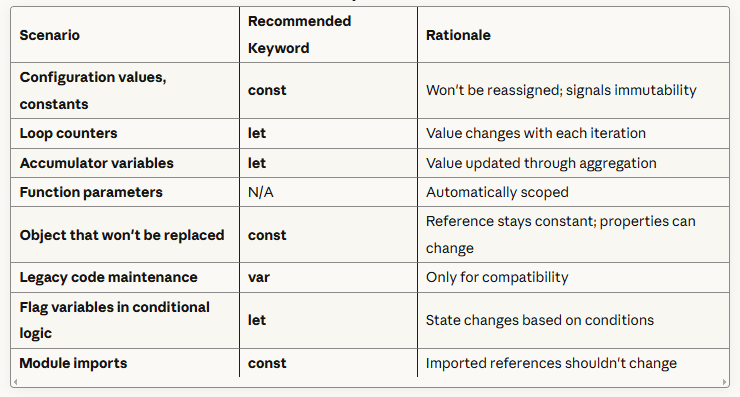
Decision Framework: When to Use Each Keyword
Scope Comparison: Block vs. Function
Visual demonstration of scope differences:
function demonstrateScopeComparison() {
  console.log("=== var (function-scoped) ===");

  for (var i = 0; i < 3; i++) {
    setTimeout(() => console.log("var i:", i), 100);
  }
  // Output: "var i: 3" (three times)
  // Reason: Single i variable in function scope, loop completes before setTimeout fires

  console.log("=== let (block-scoped) ===");

  for (let j = 0; j < 3; j++) {
    setTimeout(() => console.log("let j:", j), 100);
  }
  // Output: "let j: 0", "let j: 1", "let j: 2"
  // Reason: New j variable for each iteration, each setTimeout captures its own j
}
Professional implication: let creates a new binding for each loop iteration, making closures behave as developers expect.
Memory and Performance Considerations
const and let provide better memory management than var:
1. Garbage collection: Block-scoped variables are eligible for garbage collection as soon as their block exits, freeing memory sooner.
2. Engine optimizations: Knowing a const won't be reassigned allows JavaScript engines to optimize access patterns.
3. Reduced namespace pollution: Block scoping prevents variables from persisting in outer scopes unnecessarily.
// Poor: var leaks into function scope
function processLargeDataset(data) {
  for (var i = 0; i < data.length; i++) {
    var item = data[i];  // Remains in memory for entire function
    // Process item
  }
  // i and item still exist here, consuming memory
}

// Better: let is garbage collected after block
function processLargeDatasetOptimized(data) {
  for (let i = 0; i < data.length; i++) {
    let item = data[i];  // Eligible for collection after iteration
    // Process item
  }
  // i and item no longer exist, memory freed
}
Addressing Common Challenges, Pitfalls, and Misconceptions
Challenge 1: The const Object Mutability Confusion
Misconception: "const makes objects immutable."
Reality: const only prevents reassignment of the variable. Object properties remain fully mutable.
const userSettings = { theme: "dark", volume: 50 };

// This works (property mutation)
userSettings.volume = 75;  // ✓ Allowed

// This fails (variable reassignment)
userSettings = { theme: "light", volume: 75 };  // ✗ TypeError
Challenge 2: Loop Variable Closure Problems with var
The classic problem: Creating multiple closures in a loop with var causes all closures to share the same variable.
// Broken: All buttons log "3"
const buttons = document.querySelectorAll("button");

for (var i = 0; i < buttons.length; i++) {
  buttons[i].addEventListener("click", function() {
    console.log("Button " + i + " clicked");  // All log "3"
  });
}

// Why? Single i variable, loop completes before any click, i === 3Solutions:
Option 1: Use let (modern, preferred)
for (let i = 0; i < buttons.length; i++) {
  buttons[i].addEventListener("click", function() {
    console.log("Button " + i + " clicked");  // Logs correct index
  });
}
Challenge 3: Temporal Dead Zone Errors
Issue: Accessing let or const variables before declaration causes ReferenceError.
function demonstrateTDZ() {
  console.log(userName);  // ReferenceError
  let userName = "Alex";
}Solution: Always declare variables at the top of their scope.
function properVariableOrdering() {
  // Declarations first
  let userName;
  const MAX_LENGTH = 50;

  // Then logic
  userName = "Alex";
  console.log(userName);
}
Challenge 4: Hoisting Confusion
Problem: Not understanding that var declarations are hoisted but initializations aren't.
function hoistingProblem() {
  console.log(status);  // undefined (not ReferenceError)
  var status = "active";
}
Best practice: Declare all variables at the beginning of their scope to make hoisting behavior explicit.
Challenge 5: Global Namespace Pollution
Issue: Variables declared without keywords become global.
function createUser() {
  userName = "John";  // Implicit global! (no let/const/var)
}

createUser();
console.log(window.userName); // "John" (polluted global scope)Solution: Always use let or const. Enable strict mode to catch this error.
"use strict";

function createUser() {
  userName = "John";  // ReferenceError in strict mode
}
Actionable Implementation: Professional Variable Patterns
Pattern 1: Naming Conventions Based on Declaration Type
const for true constants: UPPER_SNAKE_CASE
const MAX_LOGIN_ATTEMPTS = 5;
const API_BASE_URL = "https://api.production.com";
const DEFAULT_TIMEOUT_MS = 30000;
const for object references: camelCase
const userProfile = { name: "Sarah", email: "sarah@example.com" };
const apiClient = new ApiClient();
let for variables: camelCase
let requestCount = 0;
let isAuthenticated = false;
let currentPage = 1;
Pattern 2: Destructuring with const
Destructuring works seamlessly with const:
const userResponse = {
  data: { id: 123, name: "Alex", email: "alex@example.com" },
  status: 200,
  headers: { "content-type": "application/json" }
};

// Destructure into const variables
const { data, status } = userResponse;
const { id, name, email } = data;

console.log(name);  // "Alex"
Pattern 3: Default Parameters with const
function createUser(
  name,
  role = "user",      // Default parameter
  permissions = []    // Default parameter
) {
  // Parameters are const by default (reassignment not recommended)
  const userId = generateId();
  const createdAt = new Date();

  return {
    id: userId,
    name,
    role,
    permissions,
    createdAt
  };
}
Pattern 4: Module Pattern with const
// userService.js
const BASE_URL = "https://api.example.com/users";

const fetchUser = async (userId) => {
  const response = await fetch(BASE_URL + "/" + userId);
  return response.json();
};

const createUser = async (userData) => {
  const response = await fetch(BASE_URL, {
    method: "POST",
    headers: { "Content-Type": "application/json" },
    body: JSON.stringify(userData)
  });
  return response.json();
};

// Export const functions
module.exports = { fetchUser, createUser };
Step-by-Step Implementation Guide: Refactoring var to let/const
Step 1: Identify All var Declarations
Use your IDE's search functionality to find all var keywords in your codebase.
Step 2: Analyze Each Variable's Usage
For each var declaration, determine:
1. Is it reassigned?
Yes → Replace with let
No → Replace with const
2. Does it need function scope?
Rarely yes → Consider refactoring the function
Usually no → Use block scope (let or const)
Step 3: Perform the Replacement
Example transformation:
// Before (using var)
function calculateOrderTotal(items) {
  var total = 0;
  var taxRate = 0.08;

  for (var i = 0; i < items.length; i++) {
    var item = items[i];
    total = total + item.price;
  }

  var tax = total * taxRate;
  var finalTotal = total + tax;

  return finalTotal;
}

// After (using let and const)
function calculateOrderTotal(items) {
  let total = 0;              // Reassigned → let
  const taxRate = 0.08;       // Never reassigned → const

  for (let i = 0; i < items.length; i++) {  // Reassigned → let
    const item = items[i];    // Never reassigned → const
    total = total + item.price;
  }

  const tax = total * taxRate;        // Never reassigned → const
  const finalTotal = total + tax;     // Never reassigned → const

  return finalTotal;
}
Step 4: Test Thoroughly
Block scoping changes can reveal previously hidden bugs. Test all affected code paths.
Step 5: Enable Linting Rules
Configure ESLint to enforce let/const usage:
{
  "rules": {
    "no-var": "error",
    "prefer-const": "warn"
  }
}
Real-World Case Study: User Authentication State Management
Let's examine a complete, production-ready example demonstrating professional variable usage.
// Authentication service with proper variable declarations
const AuthService = {
  // Constants for configuration
  TOKEN_KEY: "auth_token",
  REFRESH_TOKEN_KEY: "refresh_token",
  TOKEN_EXPIRY_MS: 3600000,  // 1 hour

  // Method: User login
  login: async function(credentials) {
    // Input validation with const
    const { email, password } = credentials;

    if (!email || !password) {
      return {
        success: false,
        error: "Email and password required"
      };
    }

    try {
      // API call with const response
      const response = await fetch("https://api.example.com/auth/login", {
        method: "POST",
        headers: { "Content-Type": "application/json" },
        body: JSON.stringify({ email, password })
      });

      const data = await response.json();

      if (response.ok) {
        // Store tokens (const for values that won't be reassigned)
        const { token, refreshToken, user } = data;

        localStorage.setItem(this.TOKEN_KEY, token);
        localStorage.setItem(this.REFRESH_TOKEN_KEY, refreshToken);

        return {
          success: true,
          user
        };
      } else {
        return {
          success: false,
          error: data.message
        };
      }
    } catch (error) {
      return {
        success: false,
        error: "Network error occurred"
      };
    }
  },

  // Method: Check authentication status
  isAuthenticated: function() {
    const token = localStorage.getItem(this.TOKEN_KEY);

    if (!token) {
      return false;
    }

    // Check token expiry (using let for mutable calculation)
    let tokenData;

    try {
      tokenData = JSON.parse(atob(token.split(".")[1]));
    } catch (error) {
      return false;
    }

    const currentTime = Date.now();
    const expiryTime = tokenData.exp * 1000;

    return currentTime < expiryTime;
  },

  // Method: Logout
  logout: function() {
    localStorage.removeItem(this.TOKEN_KEY);
    localStorage.removeItem(this.REFRESH_TOKEN_KEY);
  }
};

// Usage example
const loginForm = document.getElementById("loginForm");

loginForm.addEventListener("submit", async function(event) {
  event.preventDefault();

  // Extract form data with const
  const formData = new FormData(event.target);
  const credentials = {
    email: formData.get("email"),
    password: formData.get("password")
  };

  // Perform login with const result
  const result = await AuthService.login(credentials);

  if (result.success) {
    console.log("Login successful:", result.user);
    window.location.href = "/dashboard";
  } else {
    console.error("Login failed:", result.error);
    alert(result.error);
  }
});
Key observations:
const used for configuration values (TOKEN_KEY, TOKEN_EXPIRY_MS)
const used for function parameters and destructured values
let used only where reassignment is necessary (tokenData)
All variables properly scoped to their usage context
Conclusion & Final Takeaways
Mastering JavaScript variable declarations is foundational to writing maintainable, bug-resistant code.
Essential principles to internalize:
1. Default to const: Start with const for every variable. Only change to let when reassignment becomes necessary. This signals immutability and helps prevent accidental modifications.
2. Use let for true mutability: Reserve let for counters, accumulators, flags, and other values that genuinely need reassignment through their lifecycle.
3. Eliminate var from new code: var's function scoping and hoisting behavior creates unpredictable code. Modern JavaScript has no legitimate use case for var that isn't better served by let or const.
4. Leverage block scoping: Block-scoped variables are eligible for earlier garbage collection and create more modular, isolated code blocks.
Professional impact of proper variable usage:
Reduced bugs: Block scoping prevents variable leakage and naming conflicts
Improved readability: const immediately signals that a value won't change
Better performance: JavaScript engines can optimize const variables
Easier refactoring: Block-scoped variables have smaller blast radii when making changes
Team communication: Your declaration choice signals your intent to other developers
Join the conversation
Sign in to share your thoughts and engage with other readers.
No comments yet
Be the first to share your thoughts!